A referral program lets your existing customers, users or agents recommend your product. Signups, payments and commissions are tracked automatically. Each product has exactly one referral program.
1. Where it comes from
When you create a product, a referral program is created for it automatically with the status Pending. Activate it to start promoting.
2. Activate your referral program
- In the “Product created” pop-up, click Activate on the Referral Program card, or
- Go to Referral Program in the left menu and activate it there.
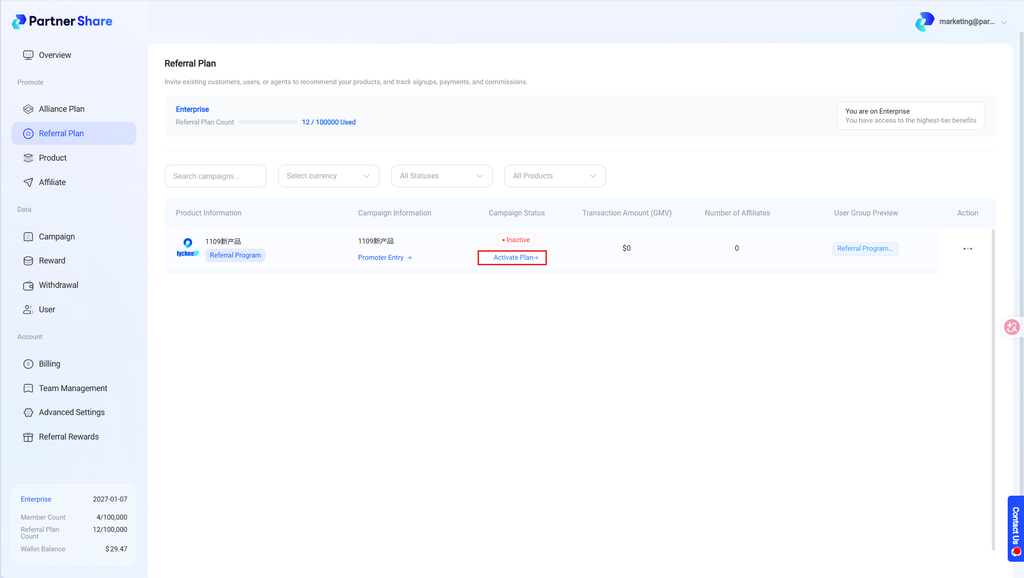
Once activated, embed the promoter portal into your product so users can get their referral links.
3. Referral program list
The list shows product, program name, status, GMV, number of promoters and user groups.
- Click Promoter Portal to view or copy the portal entry.
- The quota bar at the top shows how many referral programs your plan has used.
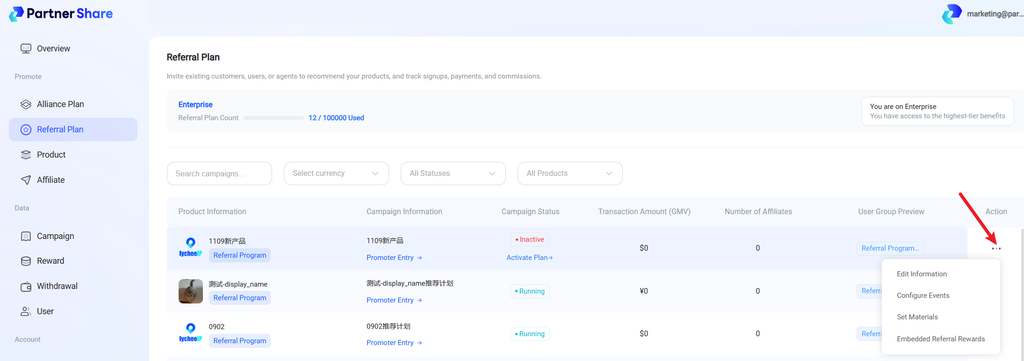
4. Edit a referral program
From the ··· menu on the right:
- Edit info: change the program name and landing page
- Configure events: set signup and transaction rewards for each user group
- Set materials: choose material packs for promoters
- Disable / Enable: pause or resume the program
Reward rules and user groups can also be managed in Product Management › Conversion Events / User Groups.


