Embedded Referral Center
Use the server-side login endpoint to generate a promoter-center access token for the current user, then embed PartnerShare via an iframe in your product’s dashboard. Users never leave your system and never need to sign up or log in again — they can view referral links, invite data, rewards, and withdrawal info directly.
Key concepts: server-side token generation, automatic promoter signup/login, frontend only renders the iframe, ideal for backend/dashboard embedding
1. When to use this
If you want to add a “Referral Center,” “Invite & Earn,” or “Affiliate Program” module directly inside your own product’s dashboard — letting users complete all promotion-related actions without leaving your system — this embedded approach is more natural and keeps a consistent brand experience compared to redirecting to an external site.
Reduce redirect drop-off: Users stay inside your product to complete promotion actions, keeping the flow continuous with a lower barrier to entry.
Lower dev cost: Referral links, invite data, reward stats, and withdrawal capability are all handled by PartnerShare — no need to build a full promotion backend yourself.
Unified account experience: Your business users can map directly to a PartnerShare promoter identity, avoiding duplicate signup and separate login.
2. Integration pattern
We recommend a three-part structure: “your frontend initiates access → your server exchanges for a token → PartnerShare renders the promoter-center page.” This keeps the API Secret secure while ensuring the iframe page loads reliably.
Embedded integration flow: #
- Your product’s frontend — The user clicks the “Referral Center” entry point, which requests your own server to generate an access token for the current user. (Never touches the API Secret directly.) → Request Token
- Your product’s server — Signs with the API Key, timestamp, and API Secret, then calls PartnerShare’s login endpoint to exchange for a promoter token. (Signs and obtains the token server-side.) → Returns Token
- PartnerShare iframe — Once the frontend has the token, it renders an iframe showing the referral center, invite data, and reward info directly inside your product’s page. (User stays in your product.)
Never call PartnerShare’s login endpoint directly from the frontend! The
API Secretmust stay on your server. The frontend should only call your own backend endpoint; your backend calls PartnerShare to get the token, then returns the result to the frontend for iframe rendering.
3. Page preview
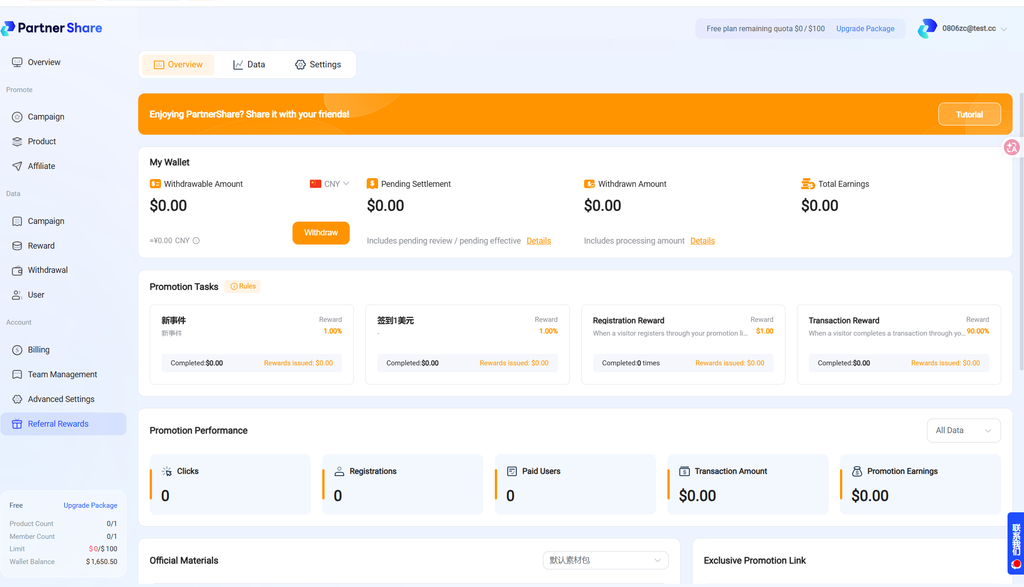
The image below shows what an embedded dashboard looks like. The referral center appears as a module inside your product’s dashboard — users can view promotion data, marketing assets, dedicated links, and invite codes directly within your own system.
4. Prerequisites
- Product creation and basic configuration completed in the PartnerShare dashboard.
- Referral campaign, reward rules, and promotion URL already configured.
- The API Key and API Secret for the relevant product already obtained.
- Your server can securely store the API Secret and make HTTPS requests.
If you’re not yet familiar with the open API’s authentication method, first read API Authentication & Signature Mechanism.
5. Getting a promoter login token
Your server must first call the following endpoint to generate a promoter-center access token for the current business user. If the user doesn’t yet exist in PartnerShare, the system automatically creates a promoter account and adds them to the default referral program; if they already exist, it reuses the existing account and refreshes the login state.
POST https://api-service.partnershare.net/api/open/v1/promoter/login
5.1 Request headers #
| Header | Required | Description |
|---|---|---|
X-Api-Key | Yes | The API Key PartnerShare assigned to the current product. |
X-Api-Timestamp | Yes | Second-precision timestamp, used to prevent replay attacks. |
X-Api-Sign | Yes | The SHA256 signature generated with the API Secret per the signing rules. |
Content-Type | Yes | application/json recommended. |
5.2 Request parameters #
| Parameter | Type | Required | Description |
|---|---|---|---|
user_id | string | Yes | The unique user identifier within your own system. PartnerShare uses this field to idempotently create or reuse a promoter account. |
email | string | No | User email. Format is validated when provided; can be used for promoter profile display. |
username | string | No | Display name. If empty, the email is used first, otherwise it’s auto-generated from user_id. |
lang | string | No | Language code, supports zh, en, zh-hk; defaults to en. |
phone | string | No | Phone number, can supplement the promoter’s profile. |
theme_mode | string | No | Referral center theme, supports light or dark; defaults to light if not provided. |
5.3 Request example #
bash
curl -X POST "https://api-service.partnershare.net/api/open/v1/promoter/login" \
  -H "Content-Type: application/json" \
  -H "X-Api-Key: pk_xxxxxxxxxxxxxxxxxxxxx" \
  -H "X-Api-Timestamp: 1776677721" \
  -H "X-Api-Sign: calculated_signature" \
  -d '{
    "user_id": "user_10001",
    "email": "user@example.com",
    "username": "Alex",
    "lang": "zh",
    "theme_mode": "light"
  }'
5.4 Response example #
json
{
  "code": 0,
  "message": "success",
  "data": {
    "token": "eyJ0eXAiOiJKV1QiLCJhbGciOiJIUzI1NiJ9...",
    "user_string_id": "ps8xk2m9qa",
    "lang": "zh",
    "theme_mode": "light"
  }
}
5.5 Response fields #
| Field | Type | Description |
|---|---|---|
code | int | Status code; 0 = success, non-zero = failure. |
message | string | Description of the response. |
data.token | string | The referral-center login token, used to build the iframe URL. |
data.user_string_id | string | PartnerShare’s internal promoter string ID, useful for troubleshooting and data linking. |
data.lang | string | The promoter’s current language. |
data.theme_mode | string | The referral center’s current theme, returns light or dark. |
6. Creating the embedded iframe
Once your frontend gets the token from your own server, set the iframe’s src to the PartnerShare referral center URL.
html
<iframe
  src="https://promoter.partnershare.net/iframe/{{token}}"
  width="100%"
  height="900"
  frameborder="0"
  allow="clipboard-write"
></iframe>
✓ Recommended approach: Request a fresh token from your server every time the user enters the referral center page, then render the iframe. Don’t hardcode a historical token into the page, and don’t cache the token long-term in frontend storage.
7. Recommended frontend/backend split
Your server is responsible for: #
Storing the API Secret, generating the signature, calling /api/open/v1/promoter/login, and returning the token to your own frontend.
Your frontend is responsible for: #
Requesting your own server’s endpoint when the user enters the referral entry point, and using the returned token to render the PartnerShare iframe.
javascript
// Frontend example: only calls your own server, never PartnerShare directly
async function mountPartnerShareIframe() {
  const res = await fetch("/api/partner-share/iframe-token");
  const data = await res.json();

  document.querySelector("#partnerShareIframe").src =
    `https://promoter.partnershare.net/iframe/${data.token}`;
}
8. FAQ
8.1 Why must the token be obtained server-side? #
Because the token-generation endpoint requires API Key signature authentication, and the API Secret can only be stored server-side. If it’s placed in the frontend, anyone could forge a request to create or log into a promoter account.
8.2 Will the same user’s promoter account be recreated every time they visit the page? #
No. PartnerShare looks up existing promoter accounts under the current product by user_id. The same user_id reuses the same promoter account and updates the necessary profile info.
8.3 What if the iframe page won’t load or shows a login error? #
Call /api/open/v1/promoter/login again to get a new token, and confirm the iframe URL is using the latest returned data.token.
8.4 Why does the API return “no referral campaign exists for this product”? #
This means the current product doesn’t yet have an available referral campaign. First complete the product’s basic configuration, reward rules, and referral campaign setup in the PartnerShare dashboard, and make sure the campaign is active.
8.5 Can I customize the iframe height? #
Yes. We recommend setting the container width to 100% and choosing a height that fits your dashboard layout — common values range from 850px to 980px. For mobile pages, adapt responsively based on your own product’s layout.
9. Integration checklist
- The frontend never stores or exposes the API Secret.
- The server generates a fresh timestamp and signature on every request.
- The same business user always uses a stable
user_id. - The iframe is rendered with the latest token, and re-fetched if it expires.


